The murky issue of licensing

Over on the excellent new-look Cloudworks, there’s a debate going on about what to do about licensing of content on the site.  There’s two questions: one is what license to choose, and the other is what to do about the stuff that’s already on the site (!).  The latter I’m going to discuss over on that article, since it really only applies to Cloudworks, but what license is the Right One is a big and more general question.

This is far from a settled issue in the educational community. There’s reasonable consensus that Creative Commons licences are Good, rather than more restrictive ones, but as you probably already know, there are multiple versions of Creative Commons licenses.   The details are set out nicely on the Creative Commons Licenses page.  As someone releasing material, there are basically four conditions you can choose to apply:

  • Attribution (BY – must give credit)
  • Share Alike (SA – can make derivative works but only if licensed under a similar licence)
  • Non-Commercial (NC – only if not for commercial purposes)
  • No Derivatives (ND – can only distribute verbatim copies, no derivative works)

You can combine (some of) these to create six distinct licences:

  • Attribution (CC:BY)
  • Attribution Share Alike (CC:BY-SA),
  • Attribution No Derivatives  (CC:BY-ND),
  • Attribution Non-Commercial (CC:BY-NC),
  • Attribution Non-Commercial Share Alike (CC:BY-NC-SA)
  • Attribution Non-Commercial No-Derivatives (CC:BY-NC-ND)

There’s also a newish licence called CC0, which is intended as a way of unambiguously releasing a work into the public domain, free of any restraint.

So – assuming your aim is to promote the widest possible access to the material – what license should you choose?

There is a big, ongoing and fundamental argument going on in the Open Educational Resources (OER) and wider online educational community about this, with Stephen Downes and David Wiley perhaps the most articulate/notable exponents of two different positions.  To caricature horribly (and my apologies to both), Stephen Downes’ position is that the most effective licence is CC:BY-NC-SA, and David Wiley’s is that simple CC:BY is better (or even CC0).  This is overlaid (or perhaps underpinned) by a difference of approach, between a strong principled approach, and a pragmatic one.  (If you’re at all interested, I really do recommend digging in to their ongoing conversation about this.  A good starting place might be this post by Stephen Downes, and this one by David Wiley, mostly on NC – or these lists of the responses of one to the other.  If you’re going to Open Ed in Vancouver, they’re planning to debate each other face-to-face, which should be very illuminating.  A recent contribution to the ongoing debate is that Wikipedia has recently moved to CC:BY-SA.)

The argument for minimal licensing (CC:BY or less) is in essence that the other conditions create un-necessary barriers to reuse and distribution.  So, for instance, insisting on Non-Commercial would stop a company distributing printed copies of the work for profit, which might make it more available than it would otherwise be.  The arguments for more restrictive licensing include a fear that commercial interests will crowd out the free sources, using their greater marketing leverage, and that requiring Share-Alike keeps the ‘open-ness’ attached to the work.

There are obvious parallels with the Free/Open Source Software debate: there, the ideologically-pure line (what you might call the Richard Stallman view) has not been anything like as widely-adopted as the more flexible one (what you might call the Linux view).  Being widely-used, of course, does not mean that the approach is right.

For educational resources, my own current personal view is that CC:BY is the licence of choice, where possible.

It’s the least restrictive license and is the lowest barrier to sharing. All the other CC licenses create speedbumps (or worse) to people who want to use or remix  material.

We know that re-use is not widespread default practice in the educational community, and adding in extra barriers seems entirely the wrong tack to me.  If you’re wanting to use something, the extra conditions create headaches that make it  – for most practical purposes – at least look like it’s easier and quicker to just re-create your own stuff.  It’s hard enough persuading colleagues that it’s a good idea to re-use material where possible rather than re-creating it, never mind if they also need a long course in Intellectual Property Rights to understand what they can and can’t do with it.  Each of the qualifications to a simple CC:BY adds extra questions that the potential reuser needs to think through.

We can dismiss ‘No-derivatives’ fairly easily: it’s an explicit barrier to remixing or editing.   As a potential user, you have to think about things like how much you’re allowed to quote/reuse as fair use/comment.  And if you are prepared to simply copy it verbatim, what constitutes verbatim?  What if you change the font?  Or print it out from an online version?  Put a page number, heading or links to other parts of your course at the top or bottom?  Can you fix a glaring and misleading typo?

‘Non-commercial’ is also full of tricky questions.  Most universities are not commercial for these purposes … except not all university activities are covered.  What about using it on a website with ads on it?  Like, say, your personal academic blog that’s hosted for free in exchange for unobtrusive text adverts?   What about a little ‘hosted for free by Company X’ at the bottom?  A credit-bearing course where all the students are funded by the State is clearly not commercial in this sense … but what about one where (in the UK context) they’re all full fee-paying foreign students?  Or a CPD-type course where there’s no degree-level credit and the learners all pay fees?

‘Share-alike’ means you have to worry about whether the system you’re wanting to use the material on allows you to use a CC licence or not.  Does, say, your institutional VLE have a blanket licence that isn’t CC-SA compatible?  And what if you want to, say, produce a print version with a publisher who (as most do) demands a fairly draconian licence?

For any given set of circumstances, there are ‘correct’ answers to most of these questions.  (And they’re certainly not all ‘No you can’t use it’ in many situations that obtain in universities.)  But you need to be pretty savvy about IP law to know what they are.  And even then, a lot of it hasn’t been tested in the UK courts yet, so you can’t be certain. Worse, what you want to do with the stuff when you’re reusing it may change in future – you might start off making a free online course, but then it might take off and you want to produce a book … but you can’t because some of the stuff you used had NC attached.  Or you might want to transfer your free non-assessed online course to a more formal for-credit version in your University on the institutional VLE … but you can’t because some of the material had SA attached.

You can be a lot more confident about future flexibility if you stick to CC:BY material, and there’s a lot less to worry about whether you’re doing it right.  So my view is that if you want to release material to be re-used as widely as possible, CC:BY makes your potential audience’s life much easier.

Complete public domain release would – on this argument – be even better, except that as an academic, I see attribution as crucial and fundamental, so I can’t let go of that!

I’m not overwhelmingly ideologically committed to this position: it’s very much a pragmatic view of what is most likely to get the best outcome.  I certainly don’t dismiss the counter-arguments about the dangers of commercial, closed pressures: they are real.  But I think on the balance of probabilities that the ease-of-reuse argument outweighs those, and CC:BY is usually the licence of choice.
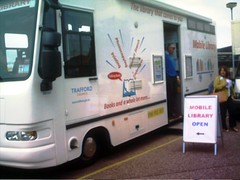
Information Use on the Move

Another IET Technology Coffee Morning, this one presented by Keren Mills, from the Open University Library.

Keren spent 10 weeks at Cambridge through the Arcadia Programme, funded by the Arcardia Trust. It’s a three-year programme in to improving library services, especially moving research libraries in to the information age. She wanted to find out what people actually wanted.

When you talk about mobile libraries … people think about vans full of books. But widespread perception that mobile internet is slow and expensive.

Students are in to texts, though – 58% of OU student respondents to Keren’s survey already receive text alerts (and continue to receive some) from their bank or whatever.  A student services pilot in sending texts was successful, sending prompt SMSs to students to remind them about study, upcoming TMAs, and so on. Students felt the university cared about them and were thinking about them – even if they didn’t need the reminder they appreciated the communication. Feedback survey showed most students wanted exam date notification and results.

Mobile-friendly websites: AACS noticed people using our websites using mobile devices.  50% of student respondents access mobile internet via their phones; 26% once a week or more. Very little interest from Cambridge students – might be younger than OU ones (on average) but they’re local to the University.

The perception is that mobile browsing is expensive – it’s better than it was, but still costs.  Some better than others – Virgin currently cap 3G data at 30p/day for up to 25Mb.

Only 26% of student respondents have downloaded apps to their phone and would so so again – higher than for overall, but not much.  iPhone might be changing that. (E.g. app being developed by KMi – the Virtual Microscope project and some others.)

Use of media on phones – students view photos most (75%)! Staff listen to music more (60%), and have more podcasts/journal articles/e-books exposure.  Students don’t, probably because we don’t prompt them to.

(An interesting discussion ensued about authentication to get access to e-journals.)

OU Library have been working to make their site more mobile-friendly. They’re using autodetecting reformatting software, which tries to suss the resolution, strips out the pictures, and reformats it.  It’s the same content, navigation and so on.

Students were particularly interested in location details and opening hours, and being able to search the catalogue. So they’re trying to make that easier. Moving towards a more CSS-based system in the future.

Safari – information skills site – has recently been overhauled.  Developed some mobile learning objects for reinforcement and revision – cli.gs/mSafari. Using their LO generator developed in-house.

Also – iKnow project – mobile learning objects, currently under evaluation.

About 33% of OU respondents have used text reference services (e.g. rail enquiries); a further 26% said they might, having heard about it through the survey.

General pattern of increased interest among OU students than others, probably because of our distributed area.

There are a range of mobile devices and emulators available in the Digilab.

Discussion

The autodetect and reformat software doesn’t work well with mobile version of Safari – so the Library site treats iPhones and iPod touches as ordinary browsers. Best practice is to give people the option of using mobile or standard version.

Digital Scholarship Hackfest

A bunch of us got together yesterday and today at Bletchley Park for a Digital Scholarship Hackfest:  Martin Weller, Will Woods, Kev McCleod, Juliette CulverNick Freear, Antony McEvoy (a designer newly joined Other Parts of the OU spending a couple of days with us), and Lynda Davies.

P1010242

The setting is great for doing techie things, although I always feel slightly awed being at Bletchley Park for work.  When I’m just in tourist gawking mode it’s fine, but when I’m doing techie things I always feel a bit of an impostor. Alan Turing and the other wartime codebreakers were doing really really clever stuff, and here I am trying to do things in that line … it’s a tall order to live up to.  The place was open to visitors while we were working, and we fondly imagined that the tourists peering in through the window would think that we were hunched over our laptops (almost exclusively Macs) were busily engaged in modern day codebreaking.

The one major downside to the venue was the terrible wifi.  It was desperately slow, and not up to supporting a roomful of geeks.  I’m sure it’s been better at other meetings I’ve been to – but it may be that something special was laid on then.  It was just enough to keep us going, but I think we’d have been a lot more productive with more.

Digital Scholarship

The Digital Scholarship project is an internal one, led by Martin, with two aims:

  1. Get digital outputs recognised. (Martin’s posted about this sort of stuff already)
  2. Encourage academics to engage with new types of output and technologies.

There’ll be a programme of face to face events and sessions, but we want an online system to help support and encourage it all, and that’s what we’re here to do.

Principles:

  1. Based around social media principles
  2. Easily adaptable
  3. Inforporate feeds/third party content easily
  4. Not look and feel like a (traditional!) OU site

On that last one, we don’t want it to feel like a carefully honed, current-standard, usual-topbar OU site.  But we do want it to look like what the OU might become – what we’d like it to become – in the future.

The audience is OU academics (and related staff), but we (may?) want to make it more open to those outside later.

What we did

We spent the first day thrashing through what we meant by digital scholarship, and what the site might do for users, and what we could build easily and quickly.  We spent the second day getting down and dirty with building something very quickly.  I say ‘we’, but it was mostly the developers – Juliette and Nick – plus Antony, our designer.  Martin and I floated around annoying them and pointlessly trying to make the wifi work better.

Sadly, Martin rejected my offer to invent a contrived and silly acronym for the project, but my suggestion to call the site ‘DISCO’ (for DIgitial SChOlarship) seemed to be reasonable enough to run with.  We had a bit of light relief thinking about visuals for the site – all browns and oranges and John Travolta pointing at the sky – but I suspect Antony was too sensible to take on our wackier suggestions, and the final site will not feature a Flash animation of a rotating glitter ball in the middle of the page sending multicoloured sparkles all over the screen.

Digital Scholarship Profiles

While we were beavering away, Tony Hirst (armed with a better net connection, no doubt) was musing on what we might be measuring in terms of metrics.  Well, here goes with how far we got.

One aspect of the project I worked on particularly was a Digital Scholarship Profile (a Discopro?).  The idea of this is some way of representing digital scholarship activity, and working towards some metrics/counts.

What we want to be able to do is to show – for each person – the range, quantity and quality of their digital scholarship outputs.

This would serve several purposes.  Firstly, it’s a stab at representing activity that isn’t captured in conventional scholarship assessments.  Secondly, by showing the possibilities, and letting you link through to see people who’ve done good stuff, you make it easier for people to develop in new ways.

We could show, for each area of digital scholarship output, what each person was doing, and how ‘good’ that was (more of which later).  On your DISCO profile the site would show your best stuff first, and as you went down the page you’d get to the less impressive things, and then (perhaps over a line, or shaded out) would be the areas where you had no activity yet.  For each area, we’d have links to:

  • suggestions for how to improve in that area (and on to e.g. Learn About guides)
  • links to the profiles of people with very ‘good’ activity in that area
  • information about how we do our sums

P1010240

Of course, metrics for online activity are hugely problematic.  They’re problematic enough for journal articles, but at least there you have some built in human quality checking: you can’t guarantee that a paper in Nature is better quality (for some arbitrary generic definition of ‘quality’) than one in the Provincial Journal of Any Old Crap, but it’s not a bad assumption.  And any refereed journal has a certain level of quality checking, which impedes the obvious ways of gaming the metrics by simply churning out nonsense papers. (Though I wouldn’t claim for a moment that there has been no gaming of research metrics along these lines.)

How do you measure, say, blog activity, or Slideshare?  You can get raw production numbers: total produced, average frequency of production, and so on.  However, there’s only negligible bars to publishing there, and any half-techie worth their salt could auto-generate semi-nonsense blog posts.

But this is relatively straightforward to measure, and nobody in academia is going to be so stupid as to simply equate quantity of stuff produced with quality, so I think we can do that without too much soul-searching.

How can we assess quality? One approach would be to take a principled stand and say that peer review is the only valid method.  This view would see any metrics for academic output as irretrievably problematic at best, and highly misleading at worst  That stance is one that might appeal particularly in disciplines which outright rejected a metrics-based approach for the REF.  The downside, of course, is that peer review is hugely expensive – even for the most selective stuff academics do (journal articles), the peer review system is creaking at the seams.  There’s no way that we could build a peer review system for digital scholarship outputs.

There are, however, some – very crude – metrics for assessing (something that might be a proxy for) quality of online resources.  You can (often) get hold statistics like how many times things have been read, number of comments made, number of web links made to the resource, and so on.  As with the production numbers, you can game these up.  It’s not entirely trivial to do more than a handful – but most academic blog posts (in the middle of the distribution) will be getting handfuls of pageviews anyway, so getting your mates to mechanically click on your posts would probably have a noticeable effect.  And these are proxy measures for quality at the very best.  The sort of stuff that’s likely to get you large amounts of online attention is not (necessarily) the sort of stuff that is of the highest academic quality.  I can guarantee that a blog post presenting a reasoned, in-depth exposition and exploration of some of the finer points of some abstruse discipline-specific theory will get a lot less views than, say, a blog post promising RED HOT PICS OF BR*TN*Y SP**RS N*K*D, for instance.  Less starkly, the short, simple stuff tends to get a lot more link love than long, heavyweight postings – which is, alas, an inverse correlation with academic rigour (though not a perfect one).

There’s also an issue that statistics in this domain will almost certainly be very highly unequal – you’ll get a classic Internet power-law distribution, where a small number of ‘stars’ get the huge overwhelming majority of the attention, and a long tail get next to nothing.  We can probably hide that to some degree by showing relative statistics – either a rank order (competitive!) or perhaps less intense by showing, e.g. quintiles or deciles, with some nice graphic to illustrate it.  We mused about a glowing bar chart, or a dial that would lean over to ‘max’ as you got better.

P1010231

This is an experiment, and we want to explore what might work, so we don’t have to solve this problem.  And in a two-day hackfest to get something going, we’re going to shortcut all that careful consideration and just see what can be done quickly – knowing that we’ll need to tweak and develop it over time.  Or even through it away entirely.

So what could we possibly measure, easily?

The model we’re running with is that there are several categories of things you might produce (research papers, blog posts, photos, etc), and for each category, there’ll be one or more service that you might use to host them – so, for instance, you might put presentations on Slideshare or on Prezi.com.  And then for each service, we can measure a whole range of statistics.

Here’s an outline of what we’re thinking:

P1010230

Categories:

  • Research paper repositories: Open Research Online and/or other institutional repository, subject-specific repository, and so on
  • Learning resources: repositories – e.g. OpenLearn, MERLOT, etc etc
  • Documents:  Scribd, Google Docs, OU Knowledge Network
  • Websites: Wikipedia (contributions – not your biography for fear of WP:BLP), resources, etc
  • Blogs: individual personal blogs, group blogs (could get feed for each one), etc
  • Presentations: Slideshare, Prezi, etc
  • Lifestream: Twitter, Tumblr, Posterous, FriendFeed, etc
  • Audio/video: podcasts, iTunesU, YouTube, Blip.tv, etc
  • Links/references: Delicious, Citeulike, Zotero, etc
  • Photos/images: Flickr, Picasa Web Albums, etc

The idea for these categories is that they’re a level at which it makes some sort of sense to aggregate statistics.  So, for instance, it makes some sense to add up the number of presentations you’ve put up on Slideshare and on Prezi … but it probably makes no sense at all to add up the number of photos you’ve posted to Flickr and the number of Tweets you’ve posted on Twitter.

Statistics – production statistics:

  • Count of number of resources produced
  • Frequency of resources produced (multiple ways of calculating!)

Statistics – impact/reception statistics:

  • Total reads/downloads/views of resources (sum of all we can find – direct, embed, etc) (also show average per resource)
  • Count of web links to resource (we generate? via Google API)
  • ‘Likes’/approval/star rating of resources (also show average per resource)
  • Count of comments on the resource (also show average per resource)

Statistics – Composite statistics

  • h-index (largest number h such that you have h resources that have achieved h reads? links? likes?)

I really quite like the idea of tracking the h-index: it takes a bit of understanding to suss how it’s calculated, s0 not everybody instantly understands it.  But it’s moderately robust and it’s a hybrid production/impact type statistic.  The impact component needs a little thought, and it might well vary from service to service.  There’s less symmetry in online statistics than there is in citations: if you get a few hundred citations for a paper, you’re doing really very well, but it’s not that hard to get a few hundred page views for an academic blog post.  A few hundred links, however, might be equivalently challenging.

We’re imagining some sort of abstraction layer for the profile, so we can plug in new services – and new categories – fairly easily.  One key point we want to get across is that we’re not endorsing a particular service or saying that people ought to use them: we’re trying to capture the activity that’s going on where it’s going on.

We’ll need to keep a history of the statistics, and also careful notes about our calculation methodologies and when they change (as they no doubt will).  Nice-to-have down the lines features could then include graphs, charts, trends (trend alerts!) and so on.

There’s no way that we can get all of these things up and running in two days of hacking – highly skilled as our developers are.  So we’re going for a couple of example ones to get the idea across, and will add others later.

We want to produce feeds of all this stuff and/or expose the raw data as much as possible.  But again, that’s one for later rather than the proof-of-concept hack we’re putting together just now.

Sadly, the wifi connection at the venue was a bit flaky and slow, so we did the hacking on local machines rather than somewhere I can point you to right now – but expect a prototype service to be visible soon!  Unless, alas, you’re outside the OU … one design decision we made early was to keep it behind the OU firewall at least initially until the system is robust enough to stand Internet scrutiny – both in terms of malicious attacks, but also in terms of getting our ideas about what this should be thrashed through.

There’s the eternal online educational issue of open-ness versus security: making things more open generally makes them more available, and (with the right feedback loops in place) better quality; but on the other hand, people – especially people who don’t live in the digital world, like our target audience – often appreciate a more private space where they can be free to take faltering steps and make mistakes without the world seeing.  We’re trying more up the walled garden end to start with, but will revisit as soon as the site has had more than two academics look at it.

Next steps

We didn’t quite have a working site when we finished, but ended up with this list of things to do to get the site up and working:

  • order URL (disco.open.ac.uk?)
  • get Slideshare embeds working (problem with existing)
  • put on server – integrate design, site (Juliette), profile (Nick)
  • integrate with SAMS
  • finish coffee functionality – Juliette
  • finish barebones profile functionality – Nick
  • allow users to add link (in Resources)
  • check of site (and extra content added) by Martin
  • put ‘alpha’ on the site

And this list of longer term actions:

  • support
  • extended profile/statistics – API/feed/data exposure
  • more integration with OU services
  • further design work
  • tag clouds / data mining
  • review of statistics/profile
  • review the (lack of) open-ness
  • get more resource to do more with the site

For now, though, the best picture of the site I can give you is this:
P1010238

(There’s more photos of our flipcharts and the venue in this photoset on Flickr.)

Farewell Vista

The IT news today is full of reports that most purchasers of Windows PCs will from now be able to upgrade their system from Windows Vista to Windows 7, for little or no money, when it becomes available in October.  This – along with Windows 7’s ‘XP simulation’ mode – is indeed probably the death knell of Windows Vista.  Which will probably be unlamented by many.

That was such an appalling vista that every sensible person would say, ‘It cannot be right that these actions should go any further.’

That’s not about Windows, it’s actually Lord Denning’s fatuous reasoning for dismissing the  Birmingham Six’s application for leave to appeal in 1980, on the startling grounds that if they succeeded in overturning their conviction for pub bombings,  it’d make it clear to everyone that there had been the most shocking and extensive fit-up. Which, of course, there had been.  ‘Appalling vista’ became a bit of a buzzphrase among people campaigning for the Birmingham Six’s eventual release.  The phrase has been coming to mind again recently.

It remains to be seen, though, whether the loss of traction by Microsoft with Vista – coupled with the explosion of platforms that aren’t conventional desktop PCs – is a recoverable blip like with Windows ME, or a clear turning point in the history of IT.

I wouldn’t bet against Microsoft’s ability to sell software at scale – they are very good at it. Writing off a company that huge with that large a cash pile and that many smart people would be daft.

But I am sure, as I said in my Babel post, that multiple platforms are here to stay, and the times when you could assume that nearly everyone using a computer had Microsoft Windows are long gone.

(Though as people have pointed out in comments and directly to me, they never really existed anyway.)

OERs, radical syndication and the Uncourse attitude

Liveblog from a technology coffee morning, 17 June 2009, by Tony Hirst.

Please ask Tony what he does – he looks at web technologies and sees what can be done with them, being “dazed and confused”, then communicates them to people through blogs and presentations.

Information and technology silos – information gets stuck in repositories, the IET Knowledge Network.  They’re isolated from other stores.  They do have advantages, but crossing between them is hard. Tony wants to soften the barriers.  Technology silos likewise – using a particular technology may exclude other people.  Twitter is an example – if you’re in, a load of stuff is accessible, if not, then not. Another example is the no-derivatives option in CC licenses.

He’s also interested in representation and re-presentation of material.  Can be physical transformation of content – physical book, or on a mobile phone, could be the same stuff.

Also collage and consumption (mash up!) – lots of people use materials in different ways in different settings, in different media.

Useful abstraction (for Tony!) is content as DATA.  He’s not interested in what the content is.  Data in the news in the US, data.gov to open up Government stats.  Moves in the UK too, Government, Guardian, and research communities trying to share information.  Presentation ‘Save the Cows‘ making point that data in a chart is “dead data” – it’s an end result, not reusable.  Finished product being shipped makes it harder to reuse.

[He’s using the JISC dev8d service SplashURL to give web refs in his presentation – so giving http://bit.ly/9C9uZ and a QR code on screen to give links for the presentation above.]

Data is a dish best served raw – http://eagereyes.org.  Text in PDFs is hard to get out.

Changing expectations – Tony’s video mashup about expectations, rights and ‘free’ content. Statement at the end says “no rights reserved” but amusingly is stored on blip.tv with default rights – i.e. All Rights Reserved!

If you can’t extract content, you can embed it in other spaces, let other people move your stuff around – even to closed document formats.

RSS!  Tony’s favourite. Syndication and feeds – offers some salvation.  It’s like an extensible messaging service.  It’s feeds that let you pass content from one place to another, packaged very simply – title, description (e.g. body of a blog post), link (often back to original source), annotations (if Atom – additional fields, e.g. geoRSS tags for latitude/longitude information), and payload (e.g. images).  If you package it right, other software can make it easy to aggregate and use these.

We ignore RSS at our peril – examples of how to use RSS beyond just Google Reader.  Bit outdated but still useful.  RSS is a series of pipes/wiring.  (Silly aside: he’s almost saying that the Internet is a series of tubes! – Twitter comment from @louis_mallow: Get the slides and do a mashup with data from http://is.gd/14kDA.)

Jim Groom stuff on WordPressMU – a syndication bus – UMW blogs. Lots of feeds. Live workthrough of how to do it.

Scott Leslie – educator as DJ – educator searches, samples, sequences, records and then performs and shares what they find. Similar workthrough of how to do this stuff.

Problems: discovery (how people find stuff), disaggregation (how people sample/take out the bits they want), representation (how they stick it back together and get it out again).

Discovery: We work in a ‘Zone of proximal discovery’ – we generally use Google, most of the time, using keywords we’re happy with and already know.  “Have you done your SEO yet?)  The OU Course Catalogue – with course descriptions – uses terminology you’d expect to learn by the time you finish the course.  How is a learner going to find that?  You search the web and can only find the courses you’ve already done. Similarly an issue generally for OERs.

Disaggregation: is a pain. Embed codes, sampling clips from videos, and so on. Easier on YouTube, can deeplink in to a specific bit.  It’s painful, hard, which discourages you.  The technology you use makes a difference for others too – e.g. PDF, makes it hard to create derived works.

Open Learn – an example. It’s authentic OU content that he can fiddle around with in a way he can don’t with other live courses, “this is a good thing”.  He loves the RSS feed for all the course units – and a host of other packaging formats. Can subscribe to a course using Google Reader – could use e.g. on an iPhone.  Feeds available: all units, units by topic, unit content – also OPML unit content feed bundles by topic. (OPML is another sort of feed – it lets you transport a bunch of RSS feeds around together.)

openlearnigg – built on coRank – imported all the content titles from OpenLearn, lets you comment, vote on and promote course material.  Also daily feeds – give you one item from an RSS every day, regardless of when they were originally published. Grazr widget with an RSS feed for the whole course, can embed in all sorts of other places.

Yale – open courses feedified – Yale Opencourseware has courses, which have contents, which have structured sections – all templated.  It’s not published as RSS, but Tony built a screenscraper (using Yahoo Pipes) to turn the reguarly-formatted pages and turns them in to RSS feeds – repackaged.  Repackage in OPML (collection of RSS feeds), plug in to the Grazr widget, can embed the content elsewhere.

Also did one for MIT, but they keep changing their website so the screenscraper keeps breaking.

WriteToReply.org – on the back of the Digital Britain Interim Report. (Digital Britain Final Report is out today!)  Tony and Joss created a paragraph-commentable version of it, uses WordPress/CommentPress At the moment they have to cut-and-paste the content in.  Each page/post is a different section of the report. Each paragraph has a unique URL, and has comments associated with it.  And there are feeds for the comments to – can represent them elsewhere (e.g. in PageFlakes).  People from the Cabinet Office had set up their own dashboard too, and set up the feeds from that in as well.

YouTube subtitles – grabbed Tweets from people with the hashtag for a presentation (Lord Carter talking about Digital Britain), along with the timestamp, then imported those in to YouTube. So then you can play back the live Twitter commentary alongside the presentation when you come back to it.

Daily feeds – aka serialised feeds – turned all OpenLearn courses in to blogs, which gives you feeds.  Can turn e.g. Digital Britain report in to a daily feed – can consume the content at their own page.

Feeds are also for live, real-time feeds – XMPP – instant messaging protocol, but can use it as a semi-universal plug/connector tool.  WordPress has a realtime feed – can see comments in real time, immediately, without the RSS delay.

Weapons of mass distraction – easy to read far too many things.

Another feed is CSV – simple comma-separated values format.  Google Spreadsheets gives you a url for a CSV file, can also write queries which work like database queries – can plug in to e.g. manyeyes wikified – and instantly get charts. “There’s no effort” … although “it’s not quite there in terms of usability”.  Putting content in to a form that makes it easy for people to move it around and reassemble.

Digital Worlds – ‘an uncourse’ – inspired by T184 Robotics and the Meaning of Life.  You could imagine it’s presented on a blog engine, because of how it looks. Also inspired by the way people split content up, don’t read things in order.  Hosted on WordPress.com, used that as the authoring environment. Wrote 4 or 5 posts a week. On the front page, published like a blog in standard reverse-chronological format.  All posts in categories (not very mutable, almost a controlled vocabulary) and tags (much looser) – gives you feeds for all of those – which lets you create lots of different course views.  So you could see e.g. videos, or the Friday Fun, or whatever. Each category or tag becomes a mini-course.  Also custom views – e.g. all the posts about particular games developed in Game Maker.

Also extra bits.  First, a Google Custom Search Engine (CSE).  On a search engine, can search one specific domain (e.g. add site:open.ac.uk to search just  OU pages – can work better than OU search engine).  The Digital Worlds CSE extracts any links to external sites posted in the course, and then lets you search across not just the course content but any sites that the course content linked to.  All done automatically.  Also did a video channel – using SplashCast.

As he was writing, was informed by what he’d done before. When did a post with a link back to a previous post, a trackback link appears on that original post.  So you can see on any given post what later posts refer to it – ’emergent structure’.  He created graphs of how all the links worked within the course blog.  Could also see paths through the course beyond the fixed category structure.  ‘Uncourse structures can freely adapt and evolve as new content is written and old content is removed.’  They rely on the educator ceding control to the future and to their students.  We try not to do forward references in writing oU stuff … but in this environment, they are created automatically when you make a backward link.  Uncourses encourage the educator to learn through other people’s eyes.  Later comments prompt further discussion and posts, and so on.  It keeps things fresh.

Questions

“We call them students because we take their money”, as opposed to people, a general audience on the web.  More seriously, it’s engaging more as a peer process rather than a didactic one.

This stuff requires a lot of skill – how do we get those skills out to educators?  Tony is doing workshops with people, and writes recipes on his blog.  Problem that when he publishes a recipe for a mashup, people tend to read it for what it is, or get hung up on the specific tools, rather than as a general technique or the underlying pattern.  (This is a well-worn problem in teaching!  Especially at the OU in trad course design. Trying to help people move from the specific examples to the general principles. And when people are overwhelmed with new concepts, they tend to latch on to things that are familiar.  You have to very patiently build up from what they do know to where you are trying to get them.  Zone of proximal development stuff!) Book recently called Mash-up Patterns does this without being too technical.  Tony planning to more specific stuff.

As an educator, posting comments and responses and so on.  Could you organise a group of students to do this collectively? How much would they need to know?  Example of say Darrell Ince’s wikibook project – getting students to write a book, farming out particular topic questions in a very structured way, that works.  Less controlled version in stuff like Jim Groom doing with student blogs, then being aggregated.

‘Quick’ question: How do you get the university as a whole to buy in to this stuff?  Er, don’t know. One reason – after spending 15 weeks at half time preparing Digital Worlds stuff, then 4 weeks writing it, then editor doing 2.5 weeks work on it – not a huge input for a 10 week courses.

Dynamic courses is hard in our context.

A new Babel

There’s an explosion of platforms to develop applications on at the moment, which is exciting in many ways – lots of new environments and possibilities to explore.  But it makes life harder for everyone – people who are making things, and people who are choosing things.

Back in the mid to late 90s, it was pretty much a PC world.  If you wanted a computer, you knew that if you had a PC, then (apart from a few vertical niche markets), you’d have access to pretty much any new software or tool that came out.  People who made things could develop for the PC and know that nearly everyone (who had a computer) could use their stuff, apart from the small minority of people who’d deliberately chosen a computer that didn’t use what everybody else was using.

And then in the late 90s to the mid 00s, it’s was pretty much a web world.  For the most part, if you had a computer and an Internet connection, you’d have access to pretty much any new tools that came out.  People who made things could develop on the web and (with a bit of futzing around with browser-specific stuff), pretty much everyone (who had a computer and an Internet connection) could use their stuff.

But now there’s not just PCs, Macs and Linux computers, there’s not just Internet Explorer, Firefox and Safari, there’s also the iPhone, Android (G1 – HTC Dream etc), Windows Mobile, Symbian/S60  (e.g. Nokia N97 and N86, out today), and the entirely new environment (webOS) for the Palm Pre (due any minute).  All of these are separate environments to use and to make things for.

It’s a nightmare.  As a user, or a developer, how do you choose?  How do you juggle all the different environments and still get stuff done?

Because juggling multiple environments is where things are.

This is all part of an ongoing transition.  When computers first arrived, there were lots of people for every computer.  Microsoft started out with the then-bold ambition “a computer on every desk and in every home, running Microsoft software” – a computer for every person.  Now we’re well in to the territory of lots of computers for every person.

This makes for harder work for everyone – to get the best out of things as a user or developer,  you need to be polyglot, able to move between platforms, learning new tools routinely.

It’s also, though, a hugely exciting range of opportunities and possibilities.   We are very much still in the middle of a golden age of information technology.

New ways of interacting: Lessons from non-standard games controllers

I gave another IET Technology Coffee Morning talk this morning, on non-standard games controllers.

Abstract

How do computers get information from you? The standard keyboard and mouse setup has been widely available since the mid-80s. Things are moving on. Other talks in this series have covered touch-sensitive surfaces, but there are other developments. Games consoles in particular are pioneering a mass market for new ways for people to interact with computers, including wireless sensors for motion, orientation, micro-myograms and encephalograms. In other words, the computer knows how you’re holding something, where you’re pointing it, how you’re standing, which muscles are twitching, and even pick up your brain waves. Examples of all of these technologies are now retailing for £100 or less. In this session, Doug will provide a critical review of current consumer-grade HCI technologies. And then we might play some games. Er, I mean, there will follow an opportunity for participants themselves to critically evaluate some of these technologies in a direct experiential mode.

Slides

Further information

Here’s the Natal demo video that I showed – the “no controller required” play system from Microsoft announced yesterday at E3:

And here’s games legend Peter Molyneux talking about how wonderful Natal is for personal interaction experiences – more here of possible educational use than in the first video:

And if you’re interested in messing around with games controllers, have a look at Johnny Chung Lee’s blog – he’s famous for Wii remote hacks but apparently has recently been working with Xbox on Natal, “making sure this can transition from the E3 stage to your living room”.

And finally

I notice that I spotted the Emotiv EPOC being announced back in February 2008, “allegedly ready for mass sale next Christmas”.  The latest on the Emotiv website I can find is that you can reserve one for $299, and “We expect to be able to deliver the product to you in 2009”. We’ll see.

CALRG 30th Anniversary – Session 3

[Crossposted to Cloudworks]

Adrian Kirkwood

Evaluating the OU Home Computing policy. First courses in 1988. A meta-project, an organisational activity.

Previously, provided students with computing facilities since 1970s – remote access and at study centres etc.  Desktop computers entered the mass market.  New Home Computing Policy required students – on a few, specific courses – to arrange their own access to a PC.  Huge change in practice, not just for students.

The Home Computer required: “an MS-DOS machine with 512K memory, disk storage, mouse, and capable of supporting graphics”, “the technical strategy does depend on having an MS-DOS capability for under £500”.

Courses: M205 Fundamentals of Computing – ‘foundation’ computing course. DT200 Intro to IT. Sent them a modem! M353 Computational Mathematics – modelling tool.

Very high priority. Practical arrangements, additional costs, course completion impact?

Evaluation team within IET – Tony Kate, Ann Jones, Gill Kirkup, Adrian Kirkwood, Robin Mason, short-term assistants. Interested in longer-term educational and social issues associated with the change, not (just) the logistical and practical ones. Different ways of working all round.

Issues:  Implications for course design. How it could enhance T&L and support.  CMC – very important for a distance education institution, big shift for OU. Many questions about access and equal opps, especially wrt gender and age – a ‘yuppie’ effect on recruitment patterns? Social and physical context – loss of control and knowledge of the setup by the organisation. Institutional change.

Example – DT200 student read “when you receive your materials, copy your materials as a backup”. Student took a photocopy.

What happened?  It wasn’t a disaster in the first year, “we got away with it”, senior management lost interest in those aspects. More course teams added, wealth of information collected and alanysed for internal reports and external publication. Was it institutional research or academic research, or both? It varied across a spectrum.

New, current, project – “English in Action” in Bangladesh – DfID funding over 9 years.  Developing communicative English – spoken particularly – through technology-enhanced interventions.  Access there is still a big issue.

Mike Sharples

Was only here for two years “but it seems like a lot longer”; partly because keeps coming back but partly because it was a very formative experience.  First proper job after PhD. Partly because job interview on 8 Dec 1980 and heard that John Lennon had died, important transition time.  Partly because first person met was Liz Beattie, became partner.

CYCLOPS – in 1980- a telewriting system.  30 years ahead of its time. Had great help – a personal PA, and resources of BT to redevelop it to his requirements.

It was to support OU tutoring – students in Regions – either had telephone tutorials or had to drive to the regional centre.  CYCLOPS meant they could go to a nearby study centres – a few miles rather than fifty or more.

Shared screen telewriting plus phone conference – like an OHP at a distance. Could write, pre-prepared slides, overlay, multiple interaction.  True WYSIWIS. Up to 10 centres connected in a live meeting.  Students preferred it to the other options.

So why not used now?  Framework for evaluation – look micro (HCI), meso, macro (organsitional) levels at each of usability, usefulness, efficiency, etc.

It worked!  Familiar system image (OHP), students operated it with no training.  Opened a cupboard door, connect it up, get it working … and it was Ok. BT conferencing centres started off – BT conference operators weren’t used to managing data connections, so had to set up their own.  Suited lots of interaction.

Worked at meso level too – tutors adapted it to their teqaching style. Adopted conventions – e.g. signing in with your handwriting at the start, identity.  Cyclops studio for pre-prepared illustrations – early Photoshop facility.

At the macro level … it worked for students, matched their needs.  Wrong business model – saved student travel costs but increased OU costs, for facilitator and line charges.  Unacceptable transfer (and increase) of costs.

Fast forward … to Smart Meeting Pro.  By Canadian company that developed SMARTboard.  Meeting room and conferencing system with telewriting system. “See how to write over applications”

Will it work? Probably not.  Micro – over-complex, is an add-on.  Meso – integration and purpose (vs smart boards).  Macro – connections (critical mass required) and meeting support.  Which is a bit sad.

(Mike’s lab do a lot of work with tech companies comparing/evaluating their tools like this.)

For technology to really take off, it has to: appeal to the youth market, and fit in to their social life.  Mini car in the 1960s – part of the 60s social life of London.  The CD-ROM – when marketed as serious CD-I as educational tool got nowhere, took off when part of computer games.  SMS and texting – small business market until teenagers discovered social uses.

What would happen for telewriting with young people and social networking?  Perhaps the new Nokia 5800 – Facebook, touchscreen – ‘tap here to write something’.  Combine Facebook (social) with telewriting.

Andrew Ravenscroft

Digital dialogues for thikning and learning.

Ideas came from conceptual change in science: collaborative argumentation key in realising stable conceptual change and development.  So developed dialogue modelling work-benge (CoLLeGE), then dialogue games (CSCL), then more flexible, powerful and easily-deployable digital dialogue game tools (InterLoc).

Learners in the ‘social web’ makes this even more crucial.  Worries about ‘The Thinker’, and Vygotsky. Greater emphasis on ‘learning dialogue’ but internalising what?  Home brew vs brewed by experts – quick and inexpert vs long-run.  Homebrew intellect vs Grolsch intellect.

What are we designing, predominantly?  New spaces for learning. Socio-cognative tools.  Improved semantic back-ends and knowledge networks.  Ambient pedagogies and ‘experience design’.  And ‘deep’ learning design.

Need to manage – or constrain – complexit.  Intelligent ‘anti-social’ software – from semantic web to the intentional web?  Sensible computing?  Bouncers on the door of courses.

Patrick McAndrew

Found his interview presentation from when he came to the OU.  Found a picture on his current website taken well before the slides were written.  Reanalysed it as a Wordle – tasks, framework, learning, course.  ‘Open’ doesn’t appear at all.

“Walter Perry told his new staff … .to design the teaching system to suit an individual working in a lighthouse off the coast of Scotland” – Sir John Daniels (no evidence found of whether Walter Perry said precisely that, but it was an idea in circulation)

Open then meant: contained, controlled, costed (course in a box) BUT ALSO available, accessible, all-inclusive, supported.  But that lighthouse keeper audience is shrinking.  Checked the quote a while ago, found a lighthouse keeper doing an OU course … and keeping a blog!  So the audience is changing.  People’s bags contain ‘too much technology’, world is becoming much more connected.

There is still a digital divide, but it’s not for us to solve.  If we assume the problems people have, we’ll get it wrong.  We should reach to the world out there, other initiatives address the digital divide.

We have gone open with our materials – OpenLearn.  Have learning that people are interested in the content, and the social connectivity.

Did a more current Wordle on last paper (with Grainne, Doug, et al) – OER, Learning, design, process, use, resource.  Getting Grolsch for free!

OLnet is about being open to the world in all sorts of ways, including our research approach.  Openness is at the bottom of communicate, share, learn.

Need to move to a more open version of open-ness, free up the control we have of the students. Accept that there is a free route.

Open now = unlimited, freed, free BUT ALSO available, accessible, connected, empowered.

CALRG 30th Anniversary – Session 2

[Crossposted to Cloudworks]

John Cook

Slides available in Slideshare.

Snapshot 1 – Cooperative Problem-Seeking Dialogues in Learning. (2000) to Snapshot 2 – Going for a Local Walkabout: Putting Urban Planning Education in Context with Mobile Phones. (2009)

Music a key feature throughout.  MetaMuse designed to adaptively structure interactions between pairs of cooperating learners – decisions made about traversing State Transition Networks (STNs). AI basis.  Lisp/Mac based.  Generated musical ideas fast so they could get verbalisation/externalisation leading to self-regulation/self-diagnosing – problem-seeking.

Picking up models of how pairs of cooperating learners.

Now at London Met, strange news lately, Learning Technology Research Institute. Prof of TEL, half-time helping university with e-learning. A pocket of excellence in the RAE.  RLO CETL, FP7 project CONTSENS, mobile learning, work with Agnes Kukulska-Hulme.  Urban area study, capturing pictures/VR as they go around. GPS-triggered events, show you old photographs/newsreels of the same area. Students work in pairs to solve tasks.  Schools started looking like prisons, then flatter.  High-end phones (HTC Diamond/N95), builtin voice recorder for capture of notes.

Continuity – the song remains the same?

User data still at the centre, and adaptively structuring interactions.

Important research issues: equity of access to cultural resources for education; learner generated context; appropriation; mobility and learning pathways; informal learning.

Informal learning has taken him to being an Investigative DJ on blip.fm.

Rick Holliman

Diverse media in here, multiple streams of information, affects how we use and produce information.  Particularly interested in science communication.

Abstract done as tweets – key events.

Followed Martian invasion – meteorite harbouring fossilised remains of ancient bacteria (?). Very controversial – was it an artifact or a real microfossil?  Much tabloid interest; interested in how science communicated in the media.

Then Dolly the sheep, 1997. Key questions – why is there only one sheep? Because the scientists doing it didn’t expect it to work, so used genetic material from their freezer … and then it did. So some controversy in the scientific – but not public – media about whether she was an actual clone because the background testing not done.

Another thing at the same time … shift in to online word in terms of news, around the UK general election. Guardian Unlimited, Electronic Telegraph.

Finger-length ratio: established in the womb, dependent on hormone balance at that time.  That’s fairly clear, but what that means in later life is much less clear.

Broadsheets changed from broad to tabloid , or compact, or Berliner. Categorisation becomes difficult – and newspapers exist in multiple formats too.  ‘Elite and popular’ almost works for printed media, but not for broadcast or online.

Language is changing, the way we describe things is also changing: abuse of vowels and pronouns is rife. The result of txting?

Many complexities of consumption and production, and data collection and analysis.

Claire O’Malley

Her new boss was on the Dolly the sheep team … and he has finished where she’s finishing.  Twenty years from NATO Advanced Research Workshop 1989, to CSCL 2009.

Conference proceedings in 1989 used a cartoon of ‘Computer-Supported Co-operative Learning’ showing a teacher standing on a computer (Mac SE) as a podium, pointing at a blackboard with ‘E=mc^2’ (shared representation), computer supporting interaction (!) but not getting in the way of teacher-student interaction (looking at each other).

Shared representations – several projects. Conceptual Change in Science. Ros Driver. 1980s, Ideas still here in latest project. More recently: Ambient Wood (Yvonne Rogers) – same thing but the technology is different. Get students to investigate real things, unmediated, but script the investigation (scripting is CSCL current buzzword) – give them representations of those.  Now Personal Inquiry (PI) with Eileen Scanlon et al.  Again, new technology but idea the same: unmediated science, mediation to help learners talk about it.

Another strand – communication. Shared ARK – Josie Taylor, Simon Buckingham Shum. Video-mediated communication with shared science simulation. Real-world question about whether to run or walk in the rain. (Answer is a brisk walk.) High-quality analogue video, real time, even enabled eye contact. (Cool!)  Video-Mediated Communication – link to superfast Janet ATM connect, very high-bandwidth digital video early/mid 90s – two video streams at once! Focus on talk that was produced. Task – same map, other instructs on a route using talking-heads video.

Interesting snippets of findings from all this video:

Despite the quality of connection – bandwidth, latency, eye contact – people don’t talk the same way as if they were face-to-face.  They just don’t.  Whether in next room or across continents.  The task can be differentially affected by that.

So if you want a bargain and you’re on dodgy ground, use the telephone not the video. If your case is strong, use video because you can persuade more.

People think that if they’re on a video, they’ll somehow leak the truth when they’re trying to deceive.  Likewise, they think they can pick up lies from others.  But people are awful at spotting lies on video, and if they do leak the truth when trying to deceive, it’s by voice, not by what they show.

People who can see each other tend to say less than on audio-only channels; gestures – nodding etc – are crucial to maintaining smoothness of interaction.

LEAD project – EU-funded – mediating f2f communication with computers using text chat … like we’re doing now in this conference with the Twitter backstream.  Good route for more interactive lectures.

Digital Replay System – these contexts produce great streams of data that take ages to analyse and make sense of.  National Centre for e-Social Science, to help people make sense of large datasets like this.  Digital ethnographyThings like auto-analysis of head-nodding.

On the ‘Horizon’ – new EPSRC Digital Economy Hub – at Nottingham – research on ubiquitous computing, big building.  Cloud computing, specks etc … very many people you don’t know will have a lot of data about you that you don’t know. How do we make it acceptable for people that they do? How do we deal with issues of privacy, identity, security?

Computers and Learning Research Group (CALRG) 30th Anniversary – Session 1

[Crossposted as a cloud in the Cloudworks cloudscape for this event.]

Notes from the Computers and Learning Research Group (CALRG) 30th Anniversary Conference, 18 May 2009, Jennie Lee Building, The Open University.

Opening from Josie Taylor, Director of IET, and then intro from Gráinne Conole mentioning the Cloudworks cloudscape for the conference.

Ann Jones

First project, late 80s – tutorial CAL evaluation – a project called Cicero.  Students accessed it by study centres or by post.  Findings: students found it useful (17%!), but used it less over time. They talked about it being useful, but had a cost/benefit analysis in their mind of potential benefits versus percieved hassle of using it – in particular Bad Computer Experiences, whether first-hand or indirect.  Things like being locked out of the terminal room, anxiety – fear of secretly being assessed.

More recent approaches include Future Technology Workshops – Mike Sharples and Giasemi Vavoula. Small teams create possible future scenarios of technology that might support pedagogy.  One idea – a little demon on your shoulder telling you information about things and people in your environment, and warning you.

Then Bubble Dialogue – to try to help children with social, emotional or behavioural problems to communivate and express themselves. Speech bubbles shown above cartoony characters – intermediation, roleplay, to enable expression that’d otherwise be tricky. Quite strong emotive/aggressive stuff coming out.

Affect very important, and still is.

Tim O’Shea

Doesn’t think the CAL group has missed much in the last 30 years.

Sad to be an orphan – Leeds CBL unit, Xerox PARC – gone.  Tim and Marc Eisenstadt saw those as the parents. MIT LOGO Lab – also gone. Edinburgh evolves, Stanford and Sussex survive, and child – London Knowledge Lab – looking lively.

CALRG did not look right – very junior staff, very democratic (anarchic), across faculties and a support unit. “Then you should have the whole university!” “Yes, but we can’t persuade the Arts Faculty to join.” IET uneasy about technology (David Hawkridge asked Tim at interview “When you come here you’re not going to do any of that computer stuff are you?”, and he fibbed and said no).  No big grants and no senior management champion.

Had PhD students right from the start. Personal dynamic media, AI/symbolic computation, language & interface design, dev testing, student modelling, simulations, models and visualisation.  And applied the stuff to courses, rather under the radar.

Key projects early – Cyclops (Paul), CSCL (Robin & Tony), Special needs (Tom & Alistair), Theory (Pask 2 – Diana), Home Computing (Norman), DESMOND (John), Shared-ARK (Randall).

The future – Extreme Computing (HeCTOR & specks); Sensible Computing (quite smart via ML); Democratic Computing (wikis, eJournals); Hybrid systems (all modalities); learner/researcher continuum; big issue (for universities) – electronic assessment; non-issue – access or ‘divide’. Technology has not plateaued – there will be bigger, faster computers that can do more.

Heartbreaking thing about AI – when it eventually gets done, people don’t notice it.  Starts with ‘that can’t possibly work’, then taken for granted that system can learn stuff. Long-term dream: smellivision. Haptics and 3D and sounds and colour are all very well but we need smells.

Assessment is the key distinguishing point of universities, and hence eAssessment is the key challenge for the future. But the way we examine is not fit for purpose. Using group work, net resources and so on … then are assessed on high-level skills by sitting at a blank piece of paper with a biro. Need new ways to assess to capture the things they do.

Why are we still here? Kept OU SMT happy 5%, CALRG clearly successful 8%, served university courses 10%, key to OU RAE 12%, recruited bright newcomers 15%, knew the future 20%, happy & jolly community 30%.

Gráinne Conole

Was told couldn’t be professor of Educational Technology, chose Professor of e-Learning … would now want to be Professor of Technology-Enhanced Learning.

There is an array of technologies … not fully exploited. Saw with the multimedia stuff in the late 80s and the emergence of the web, and still going on.

Potential for resuse with Open Educational Resources … little evidence of reuse.

New pedgagogies and new learning models.

Learning design – to bridge the gap between the affordances of new technologies, characteristics of good pedagogy, and “Open Design” – making the design process more explicit and shareable.

Left university with chemistry degree and got a job. Graduate training programme with Allied Bakeries, became area retail manager for 150 staff in 10 outfits across London. Lasted a year, was absolutely hopeless at it, just wanted to help the staff learn, no interest in business models.  Then PhD in X-ray crystallography, then lecturer posts.  Broke from chemistry at UNL (now London Met), directed Learning and Teaching Innovation, Director of T&L Centre, head of Technology-based learning.  Then Director of ILRT in Bristol from 1999, then to Southampton in 2002.

Karen Littleton

Leverhulme project looking at children’s computer-based problem solving. Computers were very new in the classroom.  Questions: Are two heads better than one? (Quasi-experimental design looking at outcomes versus pair working or independent.)  Impact of gender and ability pairings? Features of dialogue associated with learning outcomes and task performance.  Indicators that joint planning positively affects them.

Many other OU colleagues (CALRG) interested in that as a theme – Eileen, Kim on collaborative learning in primary science.   The quality of the talk and dialogue was not ideal – conflictual dynamics, simple turn-taking, withdrawal.  Much evidence that grouping at computers was common as a strategy, the quality of the joint activity was quite worrying.  Working in groups but rarely as groups.

Distinctive kind of interaction, though: exploratory talk (Douglas Barnes). Tentative expression and evaluation of ideas as collective enterprise. Critical but constructive engagement, reasoned challenges.

So trying to encourage this – developed a teaching programme designed to try to ensure children can add these ways of talking to their repertoires.  Early work was looking at how children collaborate to learn; also about how to support children to collaborate and reason together.

‘Thinking Together’ is an example – 12 lessons, talk-based – to develop a positive culture of working and talking together. Ground rules established then appplication to curriculum area.

Talk in face to face sessions happens in the moment; but computer-supported interaction offer a half-way stage between that ephemerality and paper-based permanence.  They’re captured, but still malleable.  Technologies for writing and drawing can – sensitively deployed – strengthen dialogue.  They’re an ‘improvable object’. Teacher is central.